I have decided, with the help of my wife, to return to school and pursue a degree in electronics. I will be adding links here soon to resources that I find online to help prepare me for this task. I hope to have my Extra class license before I start classes this fall. I also hope to bone up on math, programming, and logic before then also. Whatever resources I find, I will post here.
I want my Linux back
I got a really good deal on a iMac 500mhz computer for my birthday. What would normally cost $150-200 on ebay cost me $50 because the guy didn’t know what he had. I wanted a computer that I could just do my work on and know that it is stable enough to not crash everytime I turned around. My reason for leaving Linux is 2-fold. 1. Serena’s PC crashed and I gave her mine and install WinXP on it for her. 2. I like to tinker with Linux too much, and so I end up breaking it a little too often. Don’t get me wrong, Linux is a fine and stable OS, but I like to play a little too much.
As for the iMac. It’s a lie. It doesn’t “just” work. I’ve had to invest a lot of time downloading new software to get it to do what I want. I’m not rich, or even very middle-class. I can’t afford the newest version of Appleworks or even MS Office, so I use OpenOffice 2.0 RC3 (There’s not a 2.0 Stable version out for OSX). I can’t afford graphic editing software, so I use a buggy old version of TheGimp. Most of my software is either open source or not 100% legal cough. Furthermore, my periferals don’t even work. Neither OSX or OS9 can see my scanner or my USB CD Burner. Linux could. Until I networked my printer through the Microsoft Windows box and installed special Open Source drivers, it couldn’t see the printer (Mac’s don’t have parallel ports anymore). Mac’s may “just work” when you buy the newest periferals, but as for me, it’s not doing the job. Next spring, I will buy a new PC mobo with an Athlon 64 processor. I will install Debian and White Box Linux, and I won’t go back.
Learning CW
Last January, I passed the General Class written test with flying colors. I also failed the CW test miserably. In June, I failed it again, and I have one month to take it one last time or else I have to retake the written class test over again. I’m not looking forward to that at all. So, I’m putting my nose to the grindstone and I will pass the test next time.
My first learning method was visually. I was using a book called Morse Code for the Rest of Us that had each letter in code written with cute little pictures. I learned the code that way, and I can even send code at a decend rate now, but I can’t hear it. I have trouble telling the dit’s from the dah’s. After a few seconds, I get lost and everything jumbles together. That’s the problem with learning CW visually, or so I’m told. You have to start learning code by ear. That way, your ears pick up the sounds and start recognizing the patterns immediately.
Now I am using K7QO’s Code Course. The only problem I see now is with me. I have to make the time to do this. I wish I had more patience for this kind of thing. I know that once I can hear the code and translate it instantly, I will never loose it and I will be up to 20WPM in no time. It’s getting there that will be the problem.
Apartment Antennas
MFJ has an antenna that is marketed towards apartment dwellers called
the MFJ-1622. Barker and Williamson have a similar product called the
AP-10B. Both of these products look good, but the price is mighty
high. They run from $89 for the AP-10B to 99 for the MFJ-1622. The
other problem is that, at least according to eham.net, the set up
leaves a lot of be desired, and the performance can be lackluster.
If we don’t have $100 to spend on an antenna, what are the other
options? It seems to me that these antennas are made of three main
components. 1. a whip 2. a loading coil and 3. a counterpoise. I am
wondering if something could be made akin to a hamstick dipole. In
case you are not aware, a hamstick is a whip antenna that is attached
to a long loading coil that is usually used for mobile operation. The
hamstick dipole is two dipoles connected with a metal plate that can be
clamped to a support pole. Hamsticks have two main problems. First,
they are narrowband antennas. In other words, they have to be retuned
regularly to keep swr low and they require a counterpoise like a car
body. The dipole configuration effectively doubles the available
bandwidth and it solves the problem of the counterpoise. But this
creates one more problem. Who wants a 20′ dipole in their apartment?
Not to mention RF burns on family members who accidentally touch it.
If you notice one thing about the advertised apartment antennas, then
have a length of wire to take care of the counterpoise. Why not do the
same with a single hamstick? Clamp it to a patio rail or sturdy piece
of furniture, stick one end out of a window or on a patio and leave a
curled up piece of insulated wire at the base for the counterpoise.
One more thing, if you are in a really touchy complex and you try this,
I would get some hobby paint and paint it black. Most HF activity is
best at night and a black antenna would be much harder to see.
Pass along any ideas that you might have.
Links:
MFJ-1622
http://www.mfjenterprises.com/products.php?prodid=MFJ-1622
eHam Review
http://www.eham.net/reviews/detail/2035
Cost
$99.95
B&W AP-10B
http://www.bwantennas.com/ama/ap10b.ama.htm
eHam Review
http://www.eham.net/reviews/detail/667
Cost
$89.00
Geek-A-Thon
Last Friday and Saturday, I volunteered with an organization called the Kramden Institute to refurbish PC’s for underprivledged children in Durham, NC. Here is the website of the Geekathon, including one of my wife and me.

2 Meter J-Poles
First of all, I want to say thanks to the staff of Hamblog.com for the reintroduction of their fine website.
I went to the Cary, NC Hamfest this morning. This is the same hamfest where I passed the Technician class license exam last year. That means that I have been a licensed ham for one year now. Hooray!
I was mostly broke today, so I didn’t pick up anything tremendous. I just scrounged around, looking for connectors and doodads that I didn’t want to buy are Radio Shack. I did pick up a nice 1:1 balun for $1. It looks to be in good condition and is cased inside PVC. I also picked up some cheap 300ohm twinlead. 100′ for $2!
I bought this with dipoles in mind, but I remembered seeing a website or two about 2-Meter J-pole made with this stuff. I didn’t currently have a working 2-meter antenna. My magmount base is screwed. I haven’t found out where though. I just know that the SWR is shot to heck. I went to this page first: http://www.mvw.net/radio/jpole.html. The illustration was kinda confusing, but this one: http://www.bloomington.in.us/~wh2t/Jpole.htm helped fill in the gaps.
I built, and taped it to a tall cardboard box. It worked! My signal report was weaker than I liked, but it was better than nothing.
I See Pretty Colors!
Windows Longhorn 5203 Screenshots
Here are a few free screenshots of the new Windows version that is due out next year. It will be called, “Longhorn”.
I see a lot of “eye candy” here i.e. a lot of fancy graphics. The problem is that it will require equally fancy hardware to support it, not to mention the cost of the OS itself.
This is Fedora Core 4:
http://shots.osdir.com/slideshows/363_or/1.png
http://shots.osdir.com/slideshows/362_or/1.png
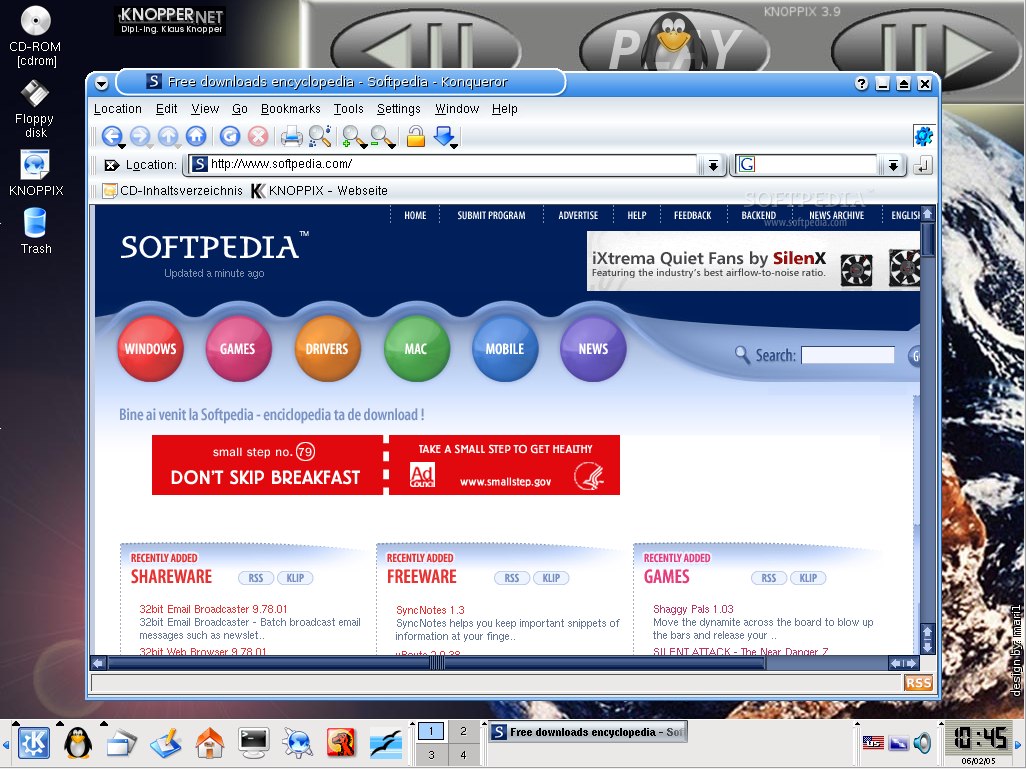
This is Knoppix 3.9
http://www.softpedia.com/screenshots//Knoppix-Live-GNULinux_2.jpg
This is Mandrake Linux using Super Karamba
http://meowing.ccm.uc.edu/~ico/Linux/Borealis/Borealis_manual/2.0/desktop1.jpg
This is an unknown distro running the Enlightenment Window Manager
http://xwinman.org/screenshots/enl-jackson.jpg
Both Linux and Windows offers some pretty impressive eye candy, but two things stand out.
1. In Linux, the desktop is so customizable, that you won’t believe it. Everything is changeable, and you don’t even need to be a programmer to do it.
2. You can have an impressive looking (and functional!) desktop with very modest hardware requirements under Linux. If you have anything less than a 1Ghz PC, I would bet that you may have to upgrade your PC in order to run the newest version of Windows. This isn’t necessarily the case with Linux.
Paranoia is not education
There’s been a lot of talk going on in the news about identity theft. I understand that this is a terrible crime that can leave a person penniless and in dire financial straits. The main culprit, of course, is the internet. The news reports are full of “Beware of this” and “Beware of that”. My beef, and this is probably something inherent in TV that I have long been immune to is that important information like this is given 30 seconds to 2 minutes on the nightly news. That is not enough time to educate anyone about the dangers of almost anything. The only thing it can do is spread fear, and that is no way to combat a problem.
For example, on NBC’s Today show suggested staying away from any website that asks for any personal information such a mother’s maiden name, etc. Okay, big dumb move. Legit companies like eBay and Amazon.com ask for that kind of information as a security reminder. They’re goal is to press you with information and make is sound as scary as possible. Fear tactics do not make for good consumers.
Here are a few good tactics that they won’t tell you in the news.
1. Get rid of Microsoft Outlook and/or Outlook Express. Hackers and virus writers sometimes specialize in hacking this software. It also has inherent vulnerabilities that make it’s users specially at risk. Get a good email program or service with built in spam blocking. Thunderbird is great, Eudora is good, and Lotus Notes is acceptable.
2. Read Snopes.com and Symantec’s Hoax page, and be aware of able to identify legit email from spam at a glance. No, you have not won a lottery in another country, nor is Bill Gates wanting to send you $50 for forwarding an email. Most importantly, Apu Nahasapeemapetilon from the country of Durkadurkastan does not have $3M for you if you help him transfer it to another bank account.
3. Make you password difficult. For example, “L1Qwpp01G5woS” is a good password. It is difficult to remember, but it is also difficult to crack. “jason77” is not a good password, neither is the word “password”. Make your password difficult, write them on 3×5 notecards for safe keeping and lock them up in a filing cabinet or lockbox when you are not using them. No hacker is so good that he can use his computer to look through your locked filing cabinet.
4. Pay your bills online. That’s right, I said it’s okay to make purchases online. If your bank is reputable, then they may offer this service for free or for a small cost. Data encryption in most banks is probably very good. If your local utility companies can take a bank draft, then do it. It will save you time and money in the long run.
5. Learn how to use encryption software. By all means, read up on how to use GnuPG or PGP. This is one powerful tool that can make almost any email program built like a TANK. Is it complicated? vYes it can be, and you might have to learn something new. It is worth it in the end especially if you use programs like Quicken or Microsoft Money. I think I’ll write up a mini howto on how to use it one of these days.
6. Finally, some of the ideas that were posted on some news site isn’t so bad. Owning a shredder is definately a plus, but how about this: Buy an el-cheapo flatbed scanner, scan those old bills that you want to keep to image files, encrypt the files, and save them to CDROM. If the CDROM gets stolen. It’s okay. The encryption that GnuPG and PGP uses is government strength. As long as the hacker doesn’t have you private key AND your password, the data there will do them no good.
You might have to do some research to accomplish some of these tips. You might have to learn something more about computers and the internet. That’s okay. An educated consumer is a safer consumer. Don’t be afraid of the internet. Be smart enough to navigate it safely.
What Linux Needs
I was thinking about this last night. Why does’t any of the main Linux distrobutions contains a Windows conversion package? It would basically make the first CD of a multi-CD installation a live CD. That live CD would contains software that would back up the user’s files in Windows. If the person has a CD Burner, they would then be given the option of burning those use files to a CDR. Then the software would continue with the installation. That way, even if the person screwed up their HDD with the partitions, then would not have lost all of their settings.
Learning Code the Old Fashioned way
Warning! INCREDIBLY POLITICALLY INCORRECT MATERIAL AHEAD!
I’m currently trying to pass my General Class Amateur Radio exam, and I found the following book online. As you may be able to tell, it was written several years ago. When I read this book, I get the image of an older gruff gentleman telling me the best way that he knows how to learn Morse Code. He really doesn’t give a damn for my new-fangled ways of doing things, but he sincerely wants me to learn. Here’s the introduction:
Almost anyone who can learn to read can learn the [Morse] code. There is no such thing as a normal person who wanted to learn the code and couldn’t. “I can’t learn the code” nearly always translates into “I won’t commit myself to the time necessary to learn it,” or that a person doesn’t really want to, even though he may think he does. Age, whether young or old, and intelligence, bright or dull, are no barriers. Youngsters of four or five can learn quickly, and oldsters of 90 have succeeded,too. You wouldn’t want to admit that a four-year old or a 90-year-old could outdo you, would you? It doesn’t require superior intelligence, just right application.Most handicaps, such as blindness or even deafness, have not stopped those who want to learn. Deaf people have been able to learn and receive using their fingers on the driver of a speaker at 30 wpm or on the knob of an electromagnetically driven “key knob” bouncing up and down at 20 wpm. (Even some people with dislexia have been able to learn to a useful extent.) It is easy if you really want to learn it and then go about learning it in the right way. Any person of reasonable intelligence can learn the Morse code and become a very good operator, able to copy it with a pencil at 25 wpm and send it clearly, smoothly and readably.
There is no real justification for the statement that “some people just can’t learn the code.” (They don’t want to.) It’s a matter of motivation, the secret of learning any skill. If you are one of those who tried in the past and somehow didn’t make it, or got stuck at 8 or 10 or 12 wpm, take heart. Forget what you previously “learned”, and start over with the principles set forth here, and you will succeed.
Some Naturally Learn Faster than Others Just as some people have a knackfor learning to play golf or tennis more quickly than others, so some have a special knack for learning the code. They catch on more quickly, but most of us take a bit longer. Kids tend to pick out the sound patterns easily and naturally without straining so they learn very fast.
Why is this politically incorrect? Phrases like, ““I can’t learn the code” nearly always translates into “I won’t commit myself to the time necessary to learn it,” or that a person doesn’t really want to, even though he may think he does.” and ““There is no real justification for the statement that “some people just can’t learn the code.” (They don’t want to.)”” tell the reader that they can’t give phony excuses to the author nor to themselves. The words, “it’s not fair” have a profound place in the vocabulary of political correctness. It’s the ultimate cop-out for mediocrity. The author here is telling the reader that they can learn with enough effort. It’s not a far stretch to say that “it’s not fair that …[fill in the blank]” would not be an acceptable answer to why a person can not learn Morse code.
Furthermore…”It is easy if you really want to learn it and then go about learning it in the right way. ” What?! The RIGHT WAY?! How JUDGEMENTAL
What also attracts me to this style of writing is that the substance of the book is about learning morse code. Period. The author does not go off on tangents about other topics. The book is concise and to the point. I may be going out on a limb here, but even that may irk some people because of the short attention span of most people today really will by an hinderance to them learning something like Morse code. Of course, as the author of this book says, “It’s a matter of motivation, the secret of learning any skill.” By cutting off all excuses, it leave the potential learner one of two choices. Give up or try harder. It’s not difficult to guess which one is easier.
 blog.theuse.net